 Binarynights

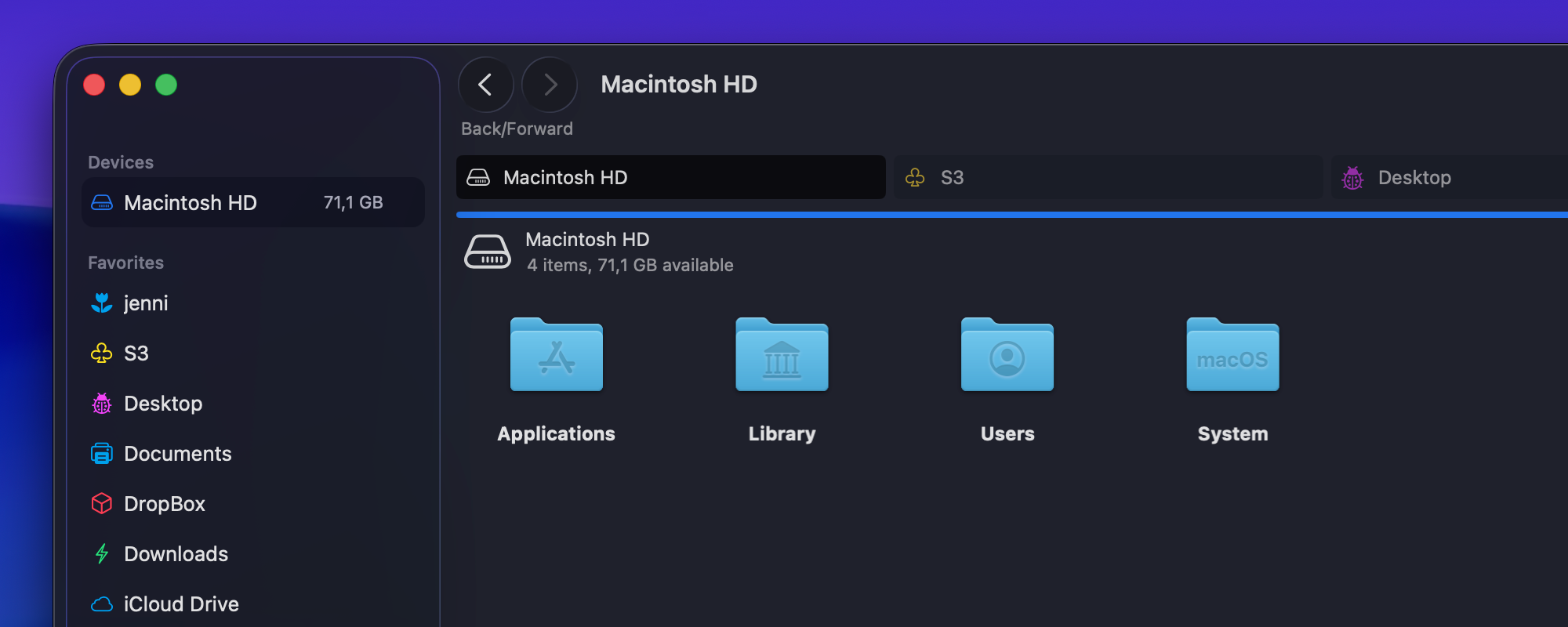
Assign custom icons when saving favorites
ForkLift has already supported custom icons for favorites, but in this release, you can now assign a custom icon directly when saving a new favorite. To add a location to your favorites, select the desired file or folder, then choose Favorites > Add to Favorites from the menu.
A pop-up will appear where you can give your favorite a name and select a Favorite Group. With this update, you can also assign a custom icon right in this dialog. Simply click the icon in the pop-up to choose a custom icon from a small window. You can also select a color at the top of the window. By default, no color is selected, so the icon color will match the theme’s color scheme and/or the selected Accent color in the System Settings. For example, it will appear blue in Light Theme using the default System Settings.

If you want a specific color, select it. To revert to the default icon, click the Use Default Image button. Once everything is set, click Add to save the favorite. You can also change the icon at any time later by editing an existing favorite.
New Amazon S3 regions
We have added five new Amazon S3 regions and reorganized the list of regions to make them easier to find. Regions are now organized into major region groups, with individual regions listed alphabetically within each group:
- Malaysia
- New Zealand
- Taipei
- Thailand
- Mexico (Central)
Fixes
ForkLift 4.4.2 contains many fixes, mostly addressing issues caused by GUI changes related to the design update to match the style of macOS Tahoe 26.
Full List of changes:
New
- Option to select a custom icon for a favorite when saving it
- Support for new Amazon S3 regions:
- Asia Pacific (Malaysia)
- Asia Pacific (New Zealand)
- Asia Pacific (Taipei)
- Asia Pacific (Thailand)
- Mexico (Central)
Fixes
- Fixes an issue that made the sidebar narrower in every new ForkLift window
- Fixes a possible crash that could occur after closing a ForkLift window
- Fixes a display issue with tag outlines when the Dark Theme was selected
- Fixes an issue in Column View where cloud icons next to folders had incorrect padding
- Fixes an issue where toggleable toolbar buttons looked disabled when active
- Numerous minor fixes and improvements
Hi,
It’s currently not possible to right-click in the preview section—for example, to change how the preview is displayed.
Yes, unfortunately, this issue is caused by changes in the new macOS, and it also affects how ForkLift behaves on older macOS versions because the newer ForkLift versions are built on Tahoe 26, where the Preview feature works differently, or is still somewhat buggy, and those system-level changes influence ForkLift’s behavior as well.
At the moment, you can’t adjust the settings for PDF files or copy text from PDFs in the Preview. Hopefully, this will either resolve itself in a future macOS update, or we will be able to find a solution.
Hello
I have enabled “Change column size” in the column display options.
The character width is not displaying correctly, causing parts of the filenames to be truncated as “…”
Please fix this issue.
https://imgur.com/a/ilifacp
Sorry for that, we will try to fix that soon.
Hello
Same here, columns auto resize is broken.
Please fix it in next release.
We are aware of this issue, we will try to fix it soon.
I am using a trial version on Tahoe and it literally pinwheels and crashes when i try to open. Worked for like 3 days. I am evaluating if I want to purchase but seems unstable.
Unfortunately, the new macOS is causing more issues than we expected. These crashes didn’t occur during the macOS Tahoe beta phase, possibly because too few users were running ForkLift in that environment for us to gather enough data to detect the problem. Please send us a crash report directly referencing this comment, and we will look into the issue. (support [at] binarynights [dot] com)
When I upload large files to my OneDrive account via Forklift, I get a transfer speed of 7-8 MB/s, but when I upload the same file via the Chrome browser, I get 35 MB/s, which is the maximum speed of my connection.
Can I get the same upload speeds in Forklift as I do via the web?
Forklift keeps quitting unexpectedly – now unusable on my Macbook Air M2
Send us the crash report at support [at] binarynights [dot] com referencing this comment.
I just updated from Forklift 3 and all my remote connections through ssh don’t work anymore. It’s stuck on “connecting to…”. I can connect normally on Ghostty/whatever terminal app I try. I even re-generated ssh keys to see if that would fix this, but it did not.
Please contact us at support [at] binarynights [dot] com
I sent an email yesterday, I hope you guys have a solution/fix, it’s really hurting my productivity, I’ve been using Forklift daily for so long…