 Binarynights

Smarter File Naming with Built-in Metadata Support
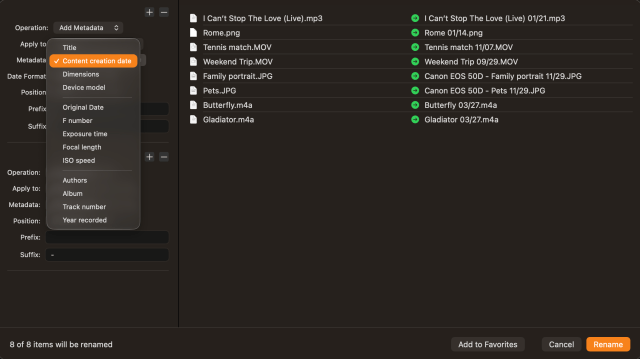
In ForkLift version 4.7.1, we have added a major new feature: the ability to include metadata in multi-renaming operations. This means ForkLift can now read and use the information stored inside files, such as photos, videos, documents and audio files, when renaming them.
Metadata is information attached to a file that describes it. For example:
- For photos: when the picture was taken, camera model, exposure time, ISO value
- For audio files: artist, album, track number, year, or title
- For documents: author, creation date
In ForkLift, you can use the following metadata fields when renaming files:
- Title
- Content creation date,
- Dimensions
- Device model
- Original date
- F number
- Exposure time
- Focal length
- ISO speed
- Authors
- Album
- Track number
- Year recorded
Using metadata allows you to turn automatically generated or meaningless filenames into structured and meaningful ones.
For example, instead of:
- IMG_2481.JPG
you can rename files to something like:
- 2025-06-28_Budapest.JPG
This makes your photo library immediately more readable and easier to navigate without opening files. For large photo collections, this is especially useful because it automatically organizes images chronologically and keeps naming consistent across thousands of files.
The same applies to audio files. For example:
- track01.mp3
can become:
- Madonna – Like a Prayer.mp3
This helps fix messy downloads and creates consistent music libraries where every file follows the same structure, making albums easier to browse and keep in order outside of music apps.
Besides the new metadata support for batch renaming, power users will also appreciate that the $PATH environment variable can now be used when creating tools in ForkLift.
Smoother SMB Integration, Richer Media Previews, and Enhanced Stability
We have also improved SMB share handling: share names are now displayed in the same way as in Finder, ensuring consistent behavior between the two apps.
In addition, ForkLift now supports previewing certain video and audio files (for example: .mka, .mkv, .webm, .wma, .wmv,. avi, .mov, .flv, .f4v) when using the third-party QuickLook Video app. Previously, these previews were only available in Finder, but ForkLift can now display the same previews when the QuickLook Video app is installed correctly.
ForkLift version 4.7.1 also fixes several minor issues in the Go to Folder window. The update resolves a crash during sync operations when excluding items based on file size, and fixes a significant issue on the upcoming macOS 27 “Golden Gate,” where dragging items in column view was not possible. We are not currently aware of other issues on this new macOS version.
The update also includes additional fixes and improvements. Please see the full changelog below.
Full List of changes:
New
- Option to use metadata when renaming files in the Multi-Rename window
- Tools can inherit the $PATH environment variable from the shell
Improvements
- New metadata added to the Info Window
- Aligns SMB share names with Finder for consistent display
- Updates the divider color between preview and info sections in the Preview Pane for better visibility in dark themes
- Adds support for previewing media files in ForkLift when the QuickLook Video app is installed
- Improves undo logging behavior for Multi-Rename operations
Fixes
- After changing the default application for a file type, the change is now saved correctly
- Fixes an issue where the entire path in the Go to Folder window was selected after choosing a path from the dropdown using Tab or Right Arrow
- Fixes an issue where duplicate paths could appear in the Go to Folder history
- Fixes an issue where selecting a path from the Go to Folder dropdown opened the item instead of revealing it in the file view
- Fixes an issue in the Go to Folder window where pressing Tab or Right Arrow after entering / inserted a second slash
- Fixes a possible crash when entering a path starting with ~ in the Go to Folder window on Amazon S3 connections
- Fixes a possible crash when selecting Size as an exclusion filter in the Sync Window or when opening the Sync Window with a previously saved file size filter
- Fixes an issue where the location of a pinned tab could change to a subfolder after switching between column view and other views
- Fixes an issue where reordering remote favorites in the sidebar was not always possible
- Fixes an issue where rotated video dimensions were displayed as negative values
How can I set a user definied date format?
Unfortunately, that is missing, but we will add it in the next update. Thank you for pointing that out.
Great!
For revised Mult-Rename, I have figured out that Multi-Rename settings saved as favorites will not be able to be used. I can select them, but there are no settings available and nothing can be done.
Workaround for you Rene
I have the same issue. If you download Forklift 4.6.4 and install it to Applications as “Forklift 464”, you will find it will give you access to all your old multi-renames. So on the plus side the code is still there. Have submitted a note to the support folk about it anyhow. Hope this helps you.
I’m sorry for this. The favorites will work again in the next version, you can either downgrade as suggested, or you can recreate the favorites. Newly added favorites are working in the current version as well.
Heya Forklift folk
I’m finding the same thing as Rene (above) – all the previous milti-rename compilations saved as Favourites are no longer displaying any contents. If I go to the Favourites manager and choose Edit there’s nothing showing in the editing option – just names.
I’m sorry for this issue. We have already fixed this problem, and the old favorites will work in the next version.